![[Contents]](contents.jpg)
On the Shanghai: Second Dynasty title screen, click on Shanghai. Choose Dragon's Eye from the pop-up menu, or...
To start a Power Dragon's Eye game from within another game mode, go to the Games menu in the menu bar and select Power Dragon's Eye.
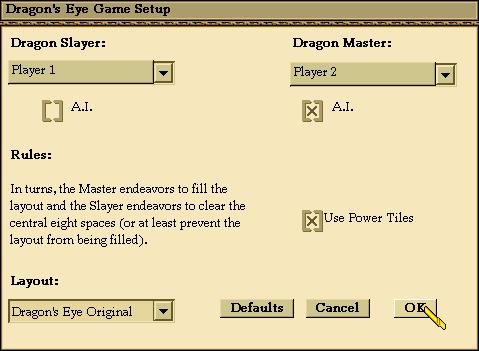
On the Dragon's Eye Game Setup dialog, choose whether you want to be the Dragon Slayer or the Dragon Master.
Check the Use Power Tiles box if you want a game with unexpected twists. Choose your preferred game layout and click OK.
On the left side of the screen is the Dragon display. When you start a game, eight tiles appear on the board. The six face-up tiles are the Dragon's "limbs" and the two face-down tiles are the Dragon's "heart." Should they later become cleared, you'll see that the spaces beneath the limbs are light brown and the spaces beneath the heart are dark brown.
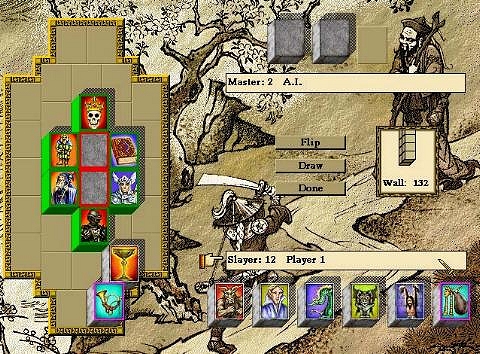
At the bottom right side of the screen are six tiles; these form the Dragon Slayer's hand. There are also three tiles at the top right of the screen; these form the Dragon Master's hand.
The objective of the Dragon Master is to build the Dragon to full strength by filling all spaces on the display one level high, and all spaces on the Dragon's heart and limbs two levels high. The Dragon Slayer, on the other hand, tries to remove all tiles from the "heart" and "limb" spaces. In either case, this is an automatic victory for the winning player. Players gain points during a game as explained in the Scoring section.
The Dragon Master places tiles on the Dragon display to fill it up. The Dragon Slayer tries to remove matching tile pairs from the display to empty it, but he must place a tile on the display if he can't find a match.
A tile becomes blocked when tiles are placed adjacent to it on both sides and cannot be removed until it is unblocked. Blocked tiles are inverted. When the Dragon Slayer removes a tile that blocks others, the now-unblocked tiles turn face up and are available to be removed.
Second-level tiles are placed only on eligible face-down tiles of the heart and limbs. These eligible tiles are highlighted to indicate that they are eligible.
As soon as the last open space in the layout is filled (including the second level), and the Dragon Slayer can't make any more moves, the game ends (the Dragon Master wins). If all tiles are removed from the heart and limb spaces, the game ends (the Dragon Slayer wins). If all 144 tiles have been drawn and played and the Dragon display is not completed or emptied, the game ends; in this case, the players' scores are compared to determine the winner.

In the default settings, you play Dragon's Eye as the Dragon Slayer, with the computer playing the Dragon Master.
When you play solitaire against the computer, you see the tile played by the computer if it's placed face up on the display, but not if it's placed face down. The tiles in your hand are always face up.
In two-player mode, players alternate turns as usual. Both hands are face down. When your turn comes, have the other player look away and select Flip to turn your hand face up. When you finish your turn by selecting Done, your hand automatically flips face down.
The Dragon Slayer always goes first. If you are playing against another player, select Flip to turn the tiles in your hand face up. Note that there is a finger pointing to your hand when it is your turn.
You have five tiles in your hand to begin with. As your turn begins, a sixth tile is automatically drawn for you.
You now try to remove matching tile pairs from the Dragon display. Removing tiles is the same as in Shanghai. You select a tile in your hand or on the board and then select a matching tile. The tiles are removed. You may remove as many tiles as you can or wish to. You may not match two tiles in the hand. You may match two tiles on the layout, or one in the hand with one in the layout.
If you ever have less than five tiles in your hand, you can immediately draw new tiles using the Draw button on the display. You continue to match tiles until you no longer can or wish to.
If you have six tiles and can make no matches, you must discard one of the tiles in your hand onto the Dragon display. Select the tile you wish to discard and then the space on the board where the tile is to go. At the end of your turn, you can have a maximum of five tiles in your hand.
Once you've completed all available actions for a turn, you may need to select Done to end your turn; in the two-player mode, your tiles will also flip over. The finger now points at the Dragon Master's hand.
The Dragon Master always goes second. When the finger points at your hand, it's your turn. You start the game with three tiles. In a two-player game, select Flip to turn your tiles face up.
In your turn, you place one of these tiles on the board.
You face only one restriction when placing tiles. If any Dragon "heart" or "limb" space is open (they are the light and dark brown spaces in the center of the display), you must fill this space, with a heart space having precedence over a limb. If the heart and limb spaces are all filled, you can place the tile anywhere.
You will want to place tiles to block as many spaces as possible.
After you place a tile, your turn ends automatically. At the appropriate time, the computer will automatically draw a tile for you. You never have more than three tiles in your hand.
The game of Dragon's Eye has been part of the Shanghai dynasty since 1990, but in this version we've added something new -- Power Tiles. As in the Dynasty game, the Power Tiles look like Jokers.

When the Dragon Slayer matches a pair of Jokers, one of these Powers will be unleashed:
- Extra Slayer Turn
- End of Turn
- Double Master Turn
- Add 4 Tiles
- Remove 4 Tiles
- Scramble
The Power is selected randomly by the computer at the time the Jokers are matched. So the Slayer cannot know whether the Power will be a friendly one or not. The ways of the Dragon's Eye are mysterious...
Dragon Slayer Hints
- Keep drawing as many tiles as possible to continue making matches. Remove
all matching tiles from the board as soon as possible.
- If you have a matching pair in your hand, place one of the pair on one of
the six spaces at the edges of the Dragon that block two tiles each. You'll be
able to unblock those spaces later at your convenience.
- Don't worry too much about having to put tiles on the Dragon display. You
will usually find "cascades" happening, where matching pairs of tiles suddenly
appear all around the display.
- If you must put a tile on the display, try to place it in a space where it
does not block others.
Dragon Master Hints
- Although you have only three tiles in your hand, you control the pace of
the game. Your objective is to bury matching pairs so your opponent cannot remove
them. Try to capture the outer spaces on the display that block two spaces each.
- Try to remember which tiles have been removed. If a pair has already been
removed and you place a third similar tile on one of the outer spaces, there is
only one tile remaining that can be matched and unblock the two tiles.
- You will often have three tiles in your hand that match others on the
display. Place the tile that will do the least damage by unblocking the minimal
number of other spaces. You may be able to bury the more damaging tiles in future
moves.
Dragon's Eye Game Points
Master
Slayer must place a tile on the display : +1
Either player places a tile on top of another : +10
Four tiles added by a Power Tile : +4
Filling the Dragon Display (Bringing the Dragon to life) : +100
Slayer
Removing a pair : +2
Clearing a Dragon Limb space : +5
Clearing a Dragon Heart space : +10
Removing a Kong : +4
Four tiles removed by a Power Tile : +4
Clearing the Display (Slaying the Dragon) : +100
 Pandamonium